
What You’re buying
How delivery works
What you get every week
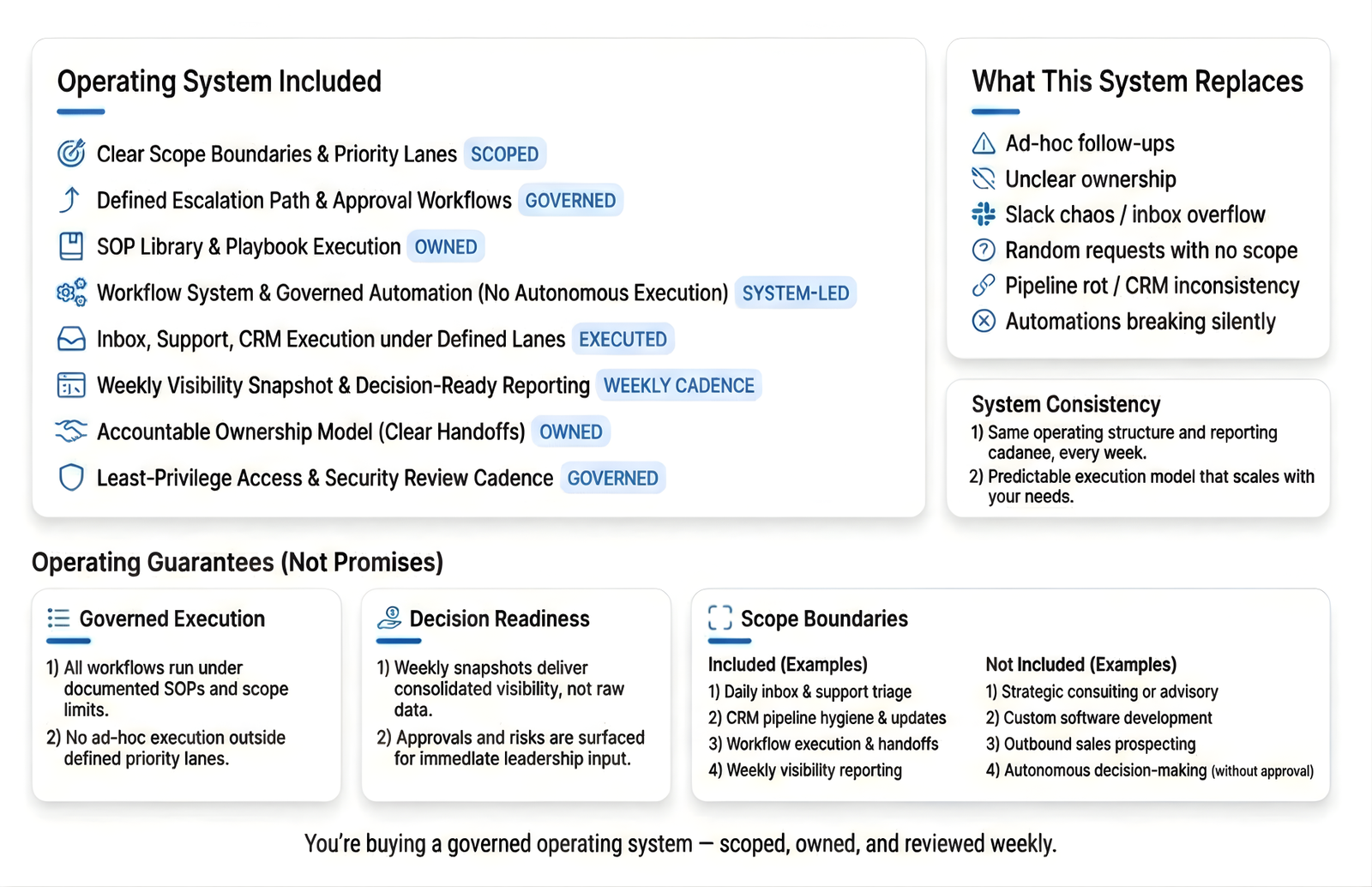
You’re buying
We operates your inbox, support, and follow-ups as a system—clear rules, clear ownership, and nothing left hanging. You get one weekly update showing what’s done, what’s still open, what needs your approval, and what’s next. Everything is scoped upfront (tools, channels, daily volume).
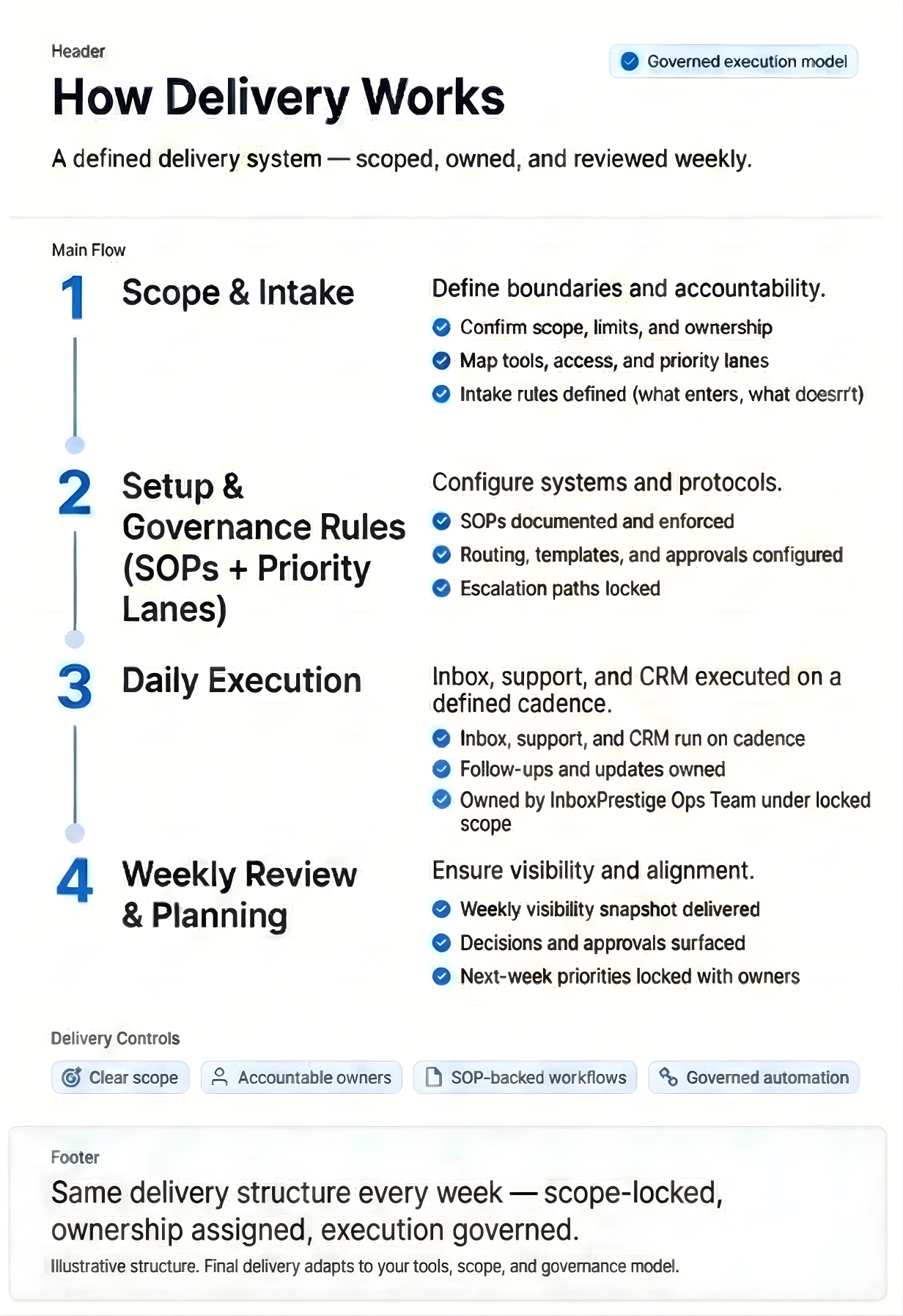
How delivery works
Onboard → Execute daily → Report weekly
- Onboard: We set access, categories, rules, and the weekly reporting format.
- Execute daily: We run the work inside your tools using SOPs and priority rules.
- Report weekly: You get one clear weekly update (done, open, risks, approvals, next).
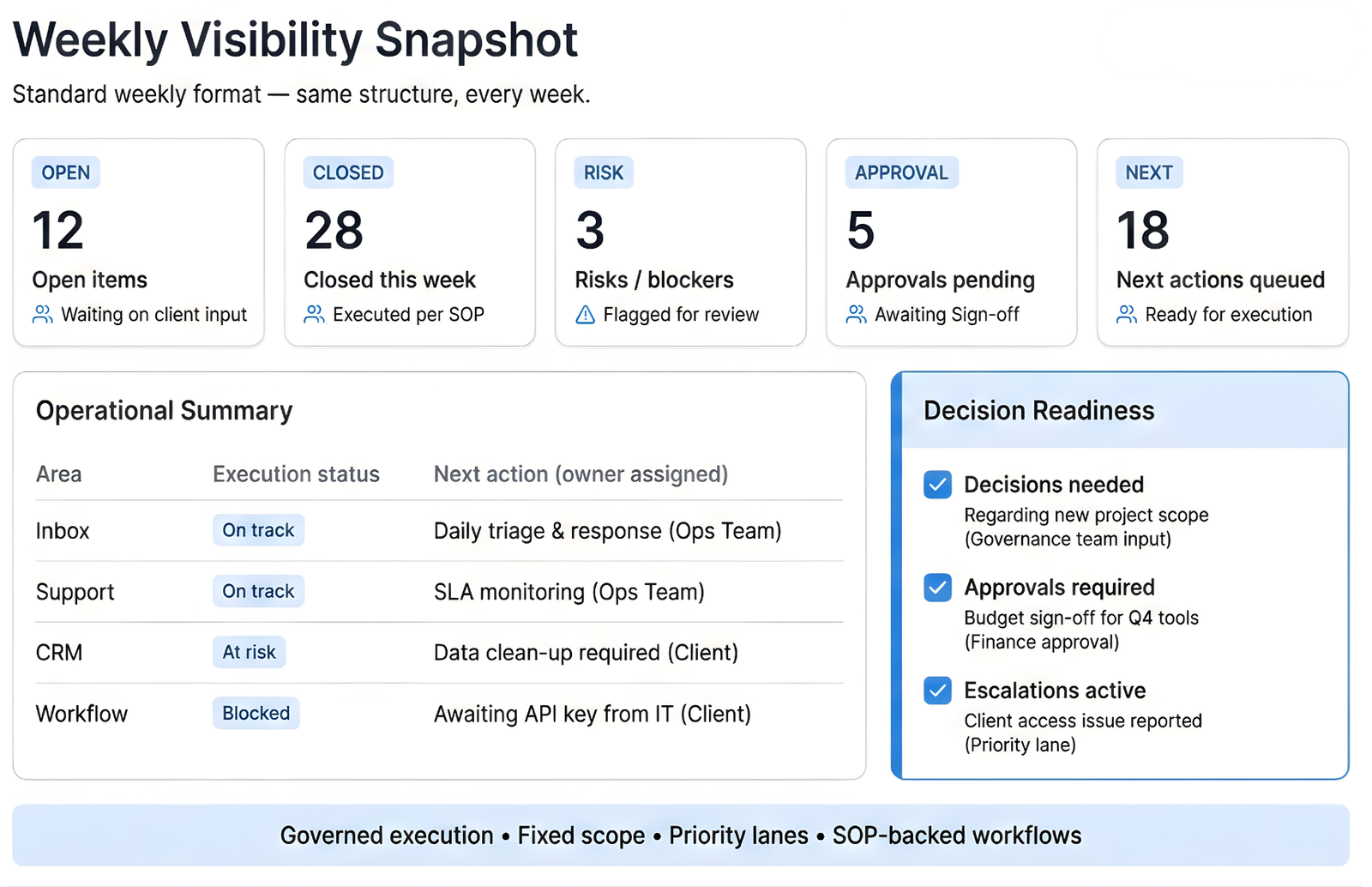
Each report is configured to your tools, workflows, and operating scope — not a generic template.
What you get every week
- Weekly summary (done vs still open)
- Open items list (what’s waiting on action)
- Risks + approvals needed (what needs your decision)
- Next-week priorities (what we’re focusing on)
Same cadence. Same format. No surprises.
Not sure where to start?
Most teams don’t need everything on day one — they need the right first layer based on where operations are breaking.
- Inbox & Calendar Control
If high-priority messages, follow-ups, or scheduling are slipping due to unclear ownership. - Lead Response & CRM Pipeline Governance
If leads arrive but pipeline stages drift, follow-ups are inconsistent, or deals stall. - Support Ops Command Center
If support volume is high and escalations, refunds, and response consistency need control. - Automation Reliability Layer
If automations fail silently, trigger inconsistently, or create operational risk without visibility.
Scope Boundaries (How We Stay Reliable)
Our reliability comes from scope discipline, not promises.
- Scope is locked weekly
New requests follow intake rules and priority lanes. - No silent scope creep
If it doesn’t fit the operating plan, it doesn’t run. - Execution follows rules, not urgency
Escalations, approvals, and exceptions are handled through defined paths. - Ownership is explicit
What we own, what you own, and where decisions are required is always clear. - Same structure every week
Predictability beats improvisation.
Core Services
The day-to-day execution we run inside your stack.
These services are bundled into core plans based on systems, channels, and daily volume. Each service runs on SOPs—not ad-hoc requests.
Support Operations (Inbox + Tickets)
Daily control across inbox and tickets—with priority rules and ownership.
We run inbound support through categories, priority rules, and clear ownership. Work is tracked until closure, and exceptions are surfaced early. You get consistent delivery without ad-hoc follow-ups.
Best for
- Teams with steady inbound volume and missed follow-ups
- Founders/operators who need daily control without firefighting
- Support teams needing consistent standards across channels
Deliverables
- Categorization + priority routing
- Ownership on every item + follow-up tracking
- Approved response templates maintained (within plan limits)
Inputs needed
- Access to inbox/helpdesk + roles
- Support categories + priority definitions
- Brand tone + escalation owner
Not included
- 24/7 coverage (unless Enterprise)
- Unlimited volume / unlimited requests
- Policy decisions (we flag, you approve)
Service targets (example)
- Daily queue review + closure tracking
- Priority-based response windows (P1/P2/P3)
- Escalations flagged with context + recommended next step
At a glance
- Tools: 1 shared inbox or 1 helpdesk (Zendesk/Freshdesk/Help Scout etc.)
- Cadence: Daily execution + weekly review
- Coverage: Mon–Fri (fixed window)
- Output: Weekly snapshot (done / open / risks / approvals / next)
SLA / quality controls
- Escalation rules + approval gates
- QA sampling (weekly)
- Controlled updates to templates/macros
Scope
Covers agreed channels and tools up to plan limits. Added channels/volume require an add-on or upgrade.
Included in
Core plans and above
Ops System (Workflows, SOPs & Automation Oversight)
The operating rules behind delivery—so work runs the same way every day.
We document how work moves from intake to completion: rules, ownership, and approvals. SOPs keep execution consistent across people and tools. Automation oversight prevents silent failures and uncontrolled changes.
Best for
- Teams where execution depends on “who’s working today”
- Companies scaling and needing repeatable operations
- Founders who want clarity and consistent handoffs
Deliverables
- Workflow map (intake → action → approval → closure)
- SOPs for key paths (priority, escalation, approvals)
- Change log for workflow/template updates
Inputs needed
- Current process (even if messy)
- Tool list + owners
- Approval rules + escalation decision-maker
Not included
- Full org redesign or consulting-heavy reengineering
- Custom app development
- Unlimited SOP creation outside agreed scope
Service targets (example)
- SOP updates reviewed on a cadence
- Changes gated through approval
- Exceptions documented + flagged
At a glance
- Tools: Notion/Docs + your workflow tools
- Cadence: Setup + controlled updates
- Coverage: Ongoing governance within plan scope
- Output: SOPs + workflow map + change log
SLA / quality controls
- Version control / change log
- Approval gates for critical flows
- Periodic workflow review
Scope
Covers agreed workflows only. New departments/processes require separate scope.
Included in
Core+ plans and above
CRM & Pipeline Operations
Pipeline accuracy through routing rules, hygiene, and next-step enforcement.
We keep your CRM decision-ready by enforcing routing, required fields, stage rules, and next steps. Stale items are flagged early and cleaned on a fixed cadence. You get reliable visibility—not guesswork.
Best for
- Teams with messy stages and unreliable forecasting
- Sales ops needing consistent handoffs and ownership
- Founders who want pipeline truth every week
Deliverables
- Stage hygiene (stale items flagged + cleaned)
- Next-step enforcement + ownership checks
- Exception list (missing fields, stuck stages)
Inputs needed
- CRM access + permissions
- Stage definitions + required fields
- Ownership rules + lead source rules
Not included
- Sales strategy, scripts, or closing training
- Compensation/commission design
- Unlimited CRM customization outside scope
Service targets (example)
- Weekly “stuck items” list
- Required-field compliance checks
- Clean handoff rules between stages
At a glance
- Tools: 1 CRM (HubSpot/Pipedrive/Zoho etc.)
- Cadence: Daily checks + weekly hygiene
- Coverage: Mon–Fri (fixed window)
- Output: Weekly pipeline hygiene snapshot
SLA / quality controls
- Exception tracking
- Weekly review cadence
- Controlled change process
Scope
One CRM per plan. Multiple CRMs require an add-on or enterprise scope.
Included in
Core+ plans and above
Weekly Visibility & Reporting
One leadership-ready weekly update—clear, consistent, decision-ready.
You receive a single weekly report showing what’s done, what’s open, what’s at risk, what needs approval, and what’s next. Same format every week. Clear visibility without daily noise.
Best for
- Leaders who want clarity without micromanaging
- Teams needing a consistent weekly rhythm
- Operators who want decisions documented
Deliverables
- Weekly summary (completed vs open)
- Risks + blockers
- Approvals needed
- Next-week priorities
Inputs needed
- Stakeholder list
- Reporting format preference
- Approval owner(s)
Not included
- Real-time dashboard builds
- Daily custom analytics
- Executive BI projects
Service targets (example)
- Delivered on fixed day/time weekly
- Standardized format every week
- Decision items explicitly listed
At a glance
- Tools: Email/Notion/Docs (your preference)
Cadence: Weekly
Coverage: Weekly leadership visibility
Output: Weekly report (done/open/risks/approvals/next)
SLA / quality controls
- Consistent template
- Clear ownership on action items
- Approval tracking
Scope
Weekly only. Expanded reporting requires add-on scope.
Included in
All plans
Enterprise Operations
For high-volume teams that need governance, security, and extended coverage.
Enterprise adds tighter controls, reliability management, and leadership-ready reporting across multiple queues—scoped during a fit check.
Revenue Ops Governance
Rules + ownership that keep growth controlled at scale.
We define and enforce standards for lead flow, ownership, and handoffs so execution stays predictable. Exceptions are flagged early and reviewed on a cadence. Governance reduces leakage as volume grows.
Best for
- Multi-channel lead flow with messy handoffs
- Teams where ownership disputes slow execution
- Companies scaling revenue operations
Deliverables
- Ownership + routing standards
- Handoff rules between teams/stages
- Exceptions list + corrective actions
Inputs needed
- Lead sources + routing logic
- Ownership model
- Approval owner(s)
Not included
- Sales leadership decisions or quota setting
- Full GTM strategy consulting
- Unlimited policy changes
Service targets (example)
- Exceptions surfaced weekly
- Rules reviewed on cadence
- Critical changes gated via approval
At a glance
- Tools: Your CRM + routing rules
- Cadence: Weekly/bi-weekly governance review
- Coverage: Enterprise scope
- Output: Governance rules + exception report
SLA / quality controls
- Change log for governance rules
- Approval gates for major changes
- Documented standards
Scope
Operational governance only (rules + enforcement). Strategy is separate.
Included in
Enterprise plans
Support Command Center (Quality + Priority + Coaching)
Controls that protect quality at high volume.
We add stronger controls: QA sampling, priority queues, and coaching loops. Escalations follow defined rules and decision handoffs. Performance stays consistent as volume increases.
Best for
- High-volume support teams
- Teams with inconsistent standards across agents
- Businesses needing reliable priority handling
Deliverables
- QA sampling + scoring
- Priority queue oversight (P1/P2/P3)
- Coaching notes + recurring issues list
Inputs needed
- QA criteria + definitions
- Priority definitions + escalation owner
- Brand/policy guardrails
Not included
- HR management or performance reviews
- 24/7 coverage unless scoped
- Unlimited QA volume outside plan
Service targets (example)
- Weekly QA scorecard
- Priority path enforced daily
- Escalations flagged with context + recommendation
At a glance
- Tools: Helpdesk + QA sheet (or your system)
- Cadence: Daily priority review + weekly QA
- Coverage: Enterprise scope
- Output: QA scorecard + priority/escalation log
SLA / quality controls
- QA rubric
- Approval gates for sensitive cases
- Controlled template updates
Scope
Quality + priority controls. Full support staffing is separate scope.
Included in
Enterprise plans
Knowledge Base & Self-Serve
Reduce repeat questions and speed up resolution with controlled documentation.
We build and maintain help articles and internal playbooks so teams resolve issues faster with fewer repeats. Updates follow a controlled review process. This reduces load and supports scale.
Best for
- Teams answering the same questions repeatedly
- Support teams wanting faster resolution time
- Products with frequent “how-to” questions
Deliverables
- New/updated articles (scoped)
- Internal playbooks for key cases
- Change log + review notes
Inputs needed
- Existing FAQs / ticket themes
- Product/policy source of truth
- Approval owner for content
Not included
- Full documentation overhaul in one go
- Product writing for marketing pages
- Unlimited article creation
Service targets (example)
- Updates shipped on cadence
- Articles tied to top ticket drivers
- Controlled approvals for edits
At a glance
- Tools: Help center/Notion/Docs
Cadence: Monthly/ongoing updates (scoped)
Coverage: Enterprise or add-on
Output: Updated articles + change log
SLA / quality controls
- Review/approval gate
- Version tracking
- Standardized article format
Scope
Incremental improvements based on top drivers. Full rebuild requires separate scope.
Included in
Enterprise plans or add-on (depending on plan)
Systems Reliability (Automations + Integrations + Data Hygiene)
Keep systems stable: monitor failures, prevent data drift, protect reporting accuracy.
We monitor critical automations and integrations to catch failures, delays, and data drift early. Fields, tags, and syncing are kept clean so reporting stays trustworthy. Reliability is managed, not assumed.
Best for
- Teams relying on multiple tools and automation
- Businesses with “silent failures” and messy data
- Leaders who need trustworthy reporting
Deliverables
- Monitoring of critical flows (scoped)
- Issue log (failures, drift, fixes)
- Data hygiene rules (fields/tags)
Inputs needed
- Integration list + owners
- Critical flow definitions
- Approval owner for changes
Not included
- Custom engineering or app development
- Unlimited integrations beyond scope
- One-off big migrations
Service targets (example)
- Failures flagged quickly (within review cadence)
- Changes gated through approvals
- Weekly reliability summary
At a glance
- Tools: Zapier/Make + CRM/helpdesk integrations (as used)
Cadence: Weekly reliability review + issue logging
Coverage: Enterprise scope
Output: Issue log + reliability summary
SLA / quality controls
- Change log
- Approval gates
- Consistent naming/field standards
Scope
Key systems only. Additional tools require add-on or upgrade.
Included in
Enterprise plans
Enterprise Ops Pod (Dedicated Team + Service Targets)
Dedicated pod + defined service targets for high reliability delivery.
A dedicated operations pod runs your scoped workflows end-to-end with defined coverage and service targets. Delivery is managed through SOPs, controls, and leadership visibility—not dependent on one person. Built for teams that need high reliability.
Best for
- High-volume teams needing reliability and accountability
- Multi-system operations needing tight controls
- Leaders who want a managed ops function
Deliverables
- Daily execution across scoped modules
- SLA/service targets tracking
- Weekly leadership-ready reporting
Inputs needed
- Full access (least privilege) + stakeholders
- Targets + priority definitions
- Approval owners + escalation paths
Not included
- Unlimited scope changes without re-scoping
- Work outside defined systems/channels
- 24/7 coverage unless contracted
Service targets (example)
- Priority-based response windows
- Defined weekly cadence + reporting
- Escalations documented with approvals
At a glance
- Tools: Your stack (scoped)
Cadence: Daily execution + weekly leadership review
Coverage: Defined window + service targets
Output: Combined ops report + targets tracking
SLA / quality controls
- SOP-driven delivery
- QA sampling + controls
- Change log + approval gates
Scope
Custom scoping required based on tools, channels, daily volume, and coverage.
Included in
Enterprise Pod engagement (custom scope)
What We Don’t Do
This is not an ad-hoc task service.
To protect execution quality, InboxPrestige does not operate outside defined rules.
We don’t:
- Accept unscoped or last-minute requests
- Execute without ownership and approval paths
- Replace leadership, strategy, or product decisions
- Work across undefined tools or channels
- “Just handle it somehow”
This keeps delivery predictable, clean, and sustainable.
What We Take Ownership Of
Clear ownership. Defined lanes. No ambiguity.
InboxPrestige operates inside a defined scope. We take ownership of execution, structure, and visibility — not vague “support.”
We own:
- Inbox, support, and CRM execution within defined lanes
- Priority routing (urgent / normal) and escalation paths
- Follow-ups, SLAs, and response consistency
- SOP-backed workflows and handoffs
- Weekly operational visibility and decision readiness
- Risk flags, blockers, and unresolved items surfaced early
Ownership means:
If it’s in scope, it runs. If it’s blocked, it’s flagged. If it needs a decision, it’s surfaced.
Operating Guarantees (Not Promises)
These are guarantees of structure — not outcome claims.
We don’t promise revenue or growth.
We guarantee how work runs.
You can expect:
- Same operating cadence every week
- Scope locked before execution
- Work owned by defined roles
- SOP-backed execution (not memory-based)
- Decisions surfaced, not buried
- Risks flagged before they become problems
- No silent failures
Structure is guaranteed. Outcomes follow from disciplined execution.
Who This Is Built For
InboxPrestige is designed for teams that value control over chaos.
Best fit if you:
- Have real inbox, support, or CRM volume
- Want execution governed — not micromanaged
- Can review decisions weekly
- Need reliability more than “hacks”
- Prefer systems over heroics
Not a fit if you want: ad-hoc help, unmanaged execution, or zero involvement.
What’s Included
You’re buying a governed operating system, not ad-hoc support.
Included in every engagement:
- Defined Scope & Priority Lanes
Clear boundaries on what is owned, how work enters, and how it is prioritized. - Inbox, Support & CRM Execution
Daily execution across agreed channels under defined rules and SLAs. - SOP-Backed Workflows
Documented operating procedures enforced consistently (not person-dependent). - Governed Automation (No Autonomous Actions)
Automation is used where appropriate, monitored, and never runs unchecked. - Clear Ownership & Handoffs
Every item has an owner, status, and next action—no ambiguity. - Weekly Visibility & Decision-Ready Reporting
A standardized weekly snapshot covering execution, risks, approvals, and next actions. - Security & Access Governance
Least-privilege access, review cadence, and controlled permissions.
What’s Not Included
This system is intentionally bounded.
Not included by default:
- Unlimited or ad-hoc task requests
- Work outside agreed scope or priority lanes
- Strategy consulting or product management ownership
- Creative production (design, copywriting, development)
- One-off emergency work without governance or intake
- Autonomous AI agents acting without human review
Anything outside scope is explicitly reviewed and approved before execution.
What services does InboxPrestige provide?
Inbox operations, support workflows, CRM & pipeline ops, and reporting.
Are services modular?
Yes. Services can be combined under one operating system.
How are boundaries defined?
Each service has clear scope, ownership, and escalation rules.
Can I start with one service?
Yes. You can begin small and expand later.
Is reporting included?
Yes. Weekly visibility is part of the operating model.
Let’s Build Your Ops System (Then Run It Daily).
Share your tools and daily volume—we’ll recommend the right plan, limits, and add-ons for your team.