
You’re buying
We run your inbox, support, and follow-ups as a system—clear rules, clear ownership, and nothing left hanging. You get one weekly update showing what’s done, what’s open, what needs approval, and what’s next. Scope is defined upfront.
Run operations like a system.
Inbox, support, and pipeline executed daily—clear ownership, enforced rules, weekly visibility.
- Priority-based routing + follow-ups
- Clean handoffs + escalation paths
- Weekly snapshot: done, open, risks, approvals
Core Operations
Enterprise Operations
AI-assisted Human-run
We use AI to speed up sorting, tagging, and first drafts—so day-to-day work moves faster. Final decisions, approvals, and sensitive cases are handled by trained humans following clear SOPs and priority rules. You’re getting a complete operating setup: workflows + execution + weekly visibility—not “AI-only” responses.
Run by trained operators
Our work is handled by trained team members who follow documented SOPs, priority rules, and approval steps. Quality checks and weekly visibility keep execution consistent—so delivery doesn’t depend on one person’s habits.
Tools We Work With
We plug into your existing stack—no rebuild required.















Audit & Priorities
We review your inbox, support flow, CRM, and tools—then define priority lanes and scope.
- Priority lanes (urgent / normal)
- Scope + limits checklist
- Access + tool map
Daily Execution
We run day-to-day ops so nothing slips and follow-ups actually happen.
- Inbox triage + draft responses
- Ticket processing + priority routing
- CRM updates + lead follow-ups
Setup & SOPs
We set up templates, routing rules, and workflows so daily execution stays consistent.
- Approved response templates
- Tags, labels, and routing rules
- SOPs + handoff rules
Weekly Visibility
You get weekly clarity—what moved, what’s pending, and what needs your input.
- Weekly ops summary
- Open loops + next actions
- Risks + “need your input” list
Who it’s for
Built for teams that run on clear workflows—daily execution across inbox, support, and pipeline, with weekly visibility you can trust.
Not a fit if…
- You need round-the-clock coverage and real-time availability (Enterprise only)
- You want “anything anytime” requests without defined lanes and limits
- You’re not open to structured workflows, approvals, and consistent CRM discipline
SaaS Teams
- Support volume + triage
- priority routing + clean handoffs
- CRM hygiene + follow-up discipline
Agencies
- Multiple clients, approvals, threads
- Follow-ups slipping / scope clarity needed
- Weekly visibility across accounts
Ecom / Marketplace
- Order + support noise
- Priority routing for urgent cases
- priority routing + weekly issue trends
Founders & Leaders
- You want decisions, not notifications
- A clean approvals queue
- Weekly ops summary to stay in control
Proof of Control
Real ops templates. Real weekly visibility.
These are the exact report and governance templates we use to run execution, track open loops, and surface approvals. What you see here is what you’ll receive—formatted, consistent, and decision-ready.
- Weekly Ops Summary (Decisions, risks, next actions)
- Escalations + priority lanes (urgent / normal)
- CRM hygiene + pipeline movement notes
- Security & access log (least-privilege)
What you get every week
Clear visibility. No surprises.
1) Weekly Ops Summary
- Completed actions
- Pending items
- Risks & escalations
- Approvals needed
2) Open Loops Tracker
- Conversations waiting onclient/team
- Follow-ups scheduled
- Blocked items with reason
3) Pipeline Hygiene Update
- Stage clean-up & movement
- Stale deals flagged
- Follow-ups queued
4) Next-Week Priorities
- Top focus areas
- Expected approvals
- Planned workflows & handoffs
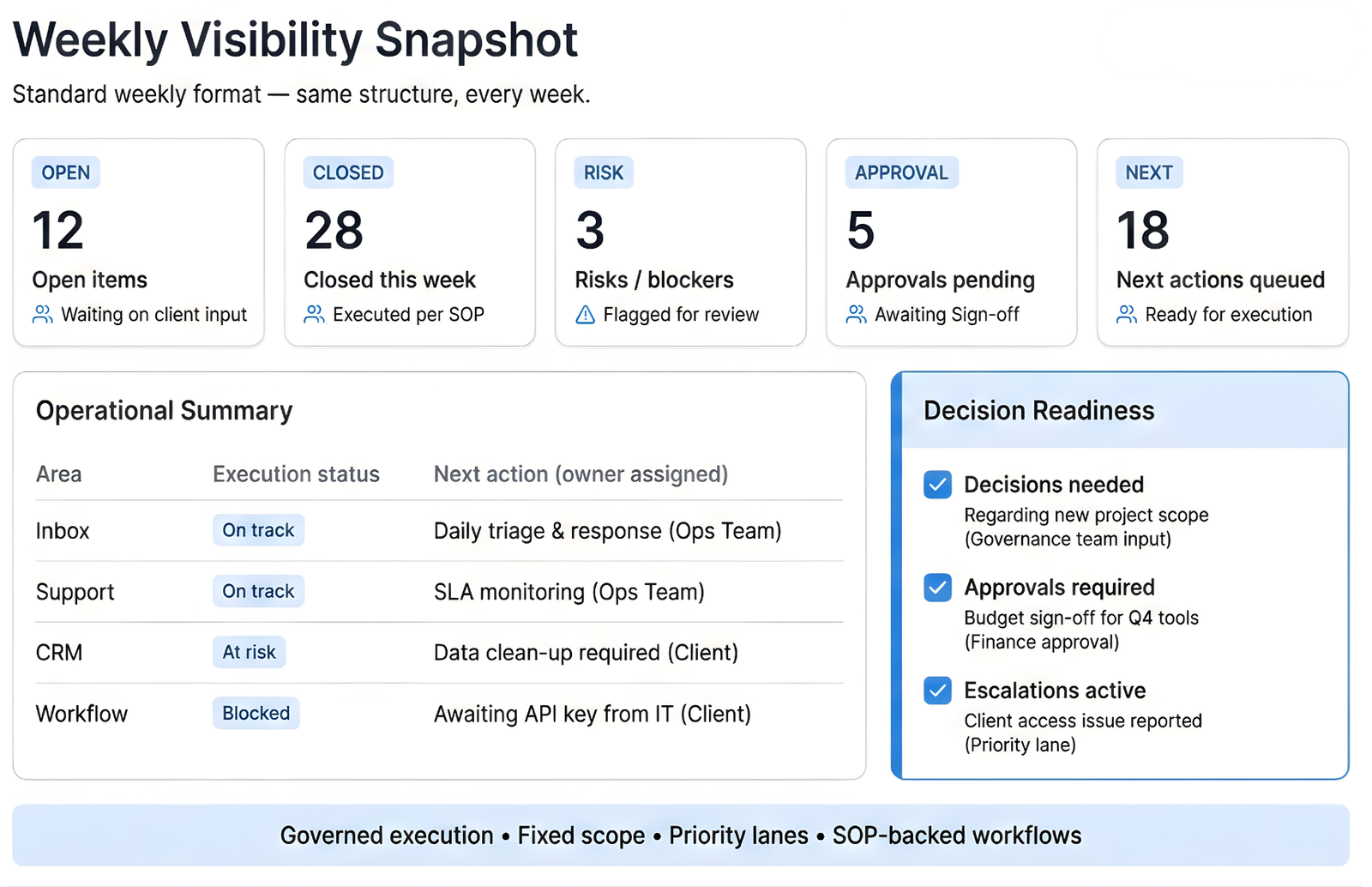
Each report is configured to your tools, workflows, and operating scope — not a generic template.
Scope We Own
Inbox & Support Control
Daily triage, response flows, routing rules, SLAs, and escalations.
CRM & Pipeline Hygiene
Stage discipline, data accuracy, follow-ups, stuck deal flags, and clean handoffs.
Workflows & Governed Automation
SOP-backed workflows and automations that are documented, reviewed, and controlled.
Priority Lanes & Escalations
What moves first, what waits, and what requires leadership input.
Weekly Visibility & Governance
Standard reporting cadence, risks flagged, decisions needed, and next-week priorities.
Where operations start to break
Not because teams don’t work hard—but because systems aren’t enforced daily.
Inbox overload
High-priority messages get buried, follow-ups slip, and ownership is unclear.
Inconsistent support handling
Responses vary by person, escalations run late, and SLAs become hard to trust.
Unreliable pipeline visibility
CRM stages drift, deals stall, and forecasts stop reflecting reality.
Security & Access Snapshot
Standard access review format-Governed,reviewed, and enforced weekly.
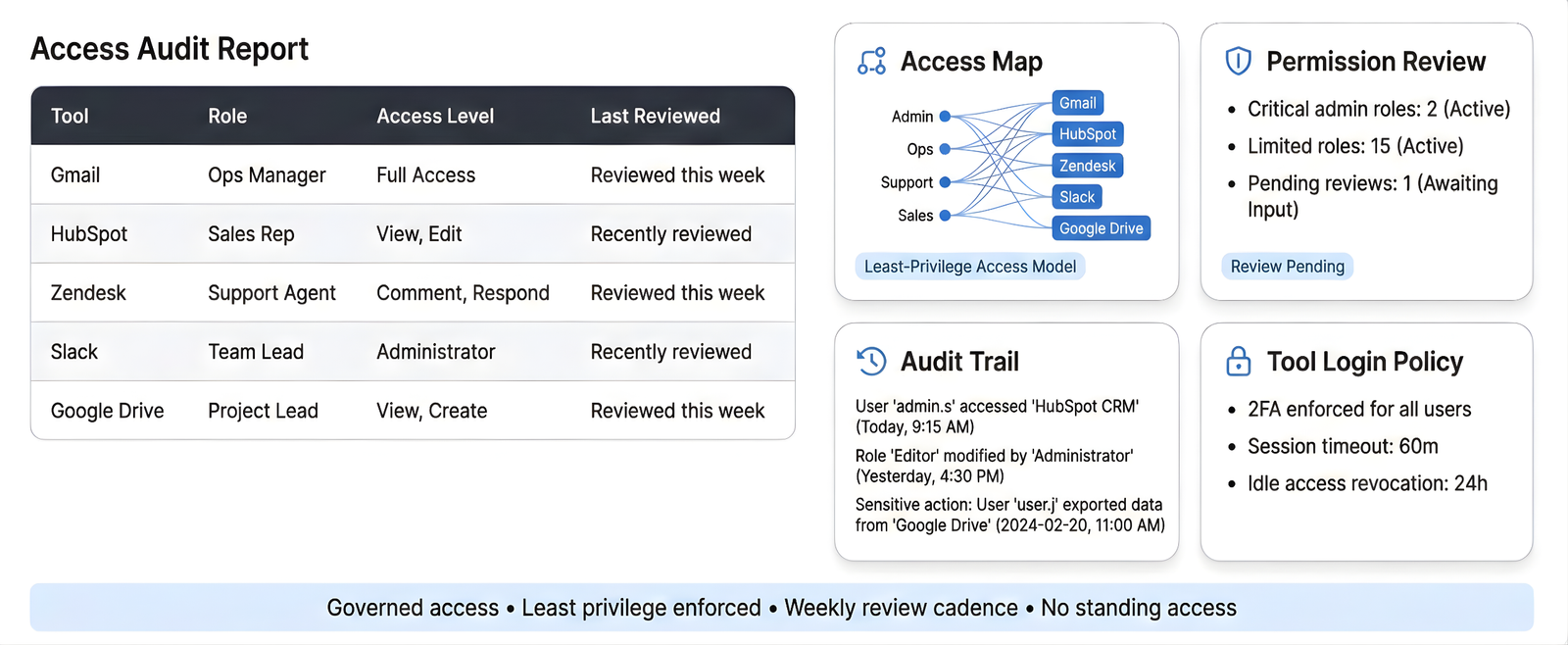
Illustrative structure.Final formats adapt to your tools,scope,and governance model.
Security & Access
Professional access routing for day-to-day operations.
1) Access Control (Least Privilege)
- Role-based access: only what’s needed to execute
- Separate tool logins (no shared personal passwords)
- Access removed on request or at offboarding
2) Credential Management
- Password manager supported: 1Password / Bitwarden
- Secure sharing via vault invites / shared items
- No credentials stored in docs, chats, or email threads
3) NDA & Confidentiality
- NDA available on request
- Client data treated as confidential across systems and communication
4) Audit Trail & Handoff Rules
- Work updates recorded in agreed system (CRM / Notion / ticketing)
- Clear handoff notes for escalations & approvals
- Weekly log: what changed, what’s pending, what needs decision
What This Means in Practice
- Every item has a clear owner
- Every process runs on a documented SOP
- Every automation is governed, not autonomous
- Every week ends with visibility, not assumptions
Your Operating Guarantees (Not Promises)
These are structural guarantees built into how we operate:
- Clear Scope Lock
Work happens only inside the agreed scope — no silent scope creep. - Owned Execution
If it’s in scope, it’s owned. Not monitored. Not “assisted.” - Governed Automation
Automations are logged, reviewed, and reversible. - Priority Enforcement
Urgency follows defined lanes — not noise. - Weekly Decision Readiness
You always know what’s done, blocked, at risk, or waiting on you.
Operational Outcomes
Typical improvements we aim for after setup—actual results depend on volume, tools, and response time.
Inbox under control
A structured triage flow so priority messages don’t get buried.
Escalations routed with rules
Clear lanes for urgent, revenue, and sensitive issues—no guesswork.
Pipeline kept clean weekly
Stages reviewed, stale items flagged, and next actions queued.
Open loops don’t slip
Follow-ups tracked until closed or handed off.
Weekly visibility for decisions
A single weekly update that highlights risks and approvals needed.
Operational Outcomes
Clear results produced by governed execution – not activity
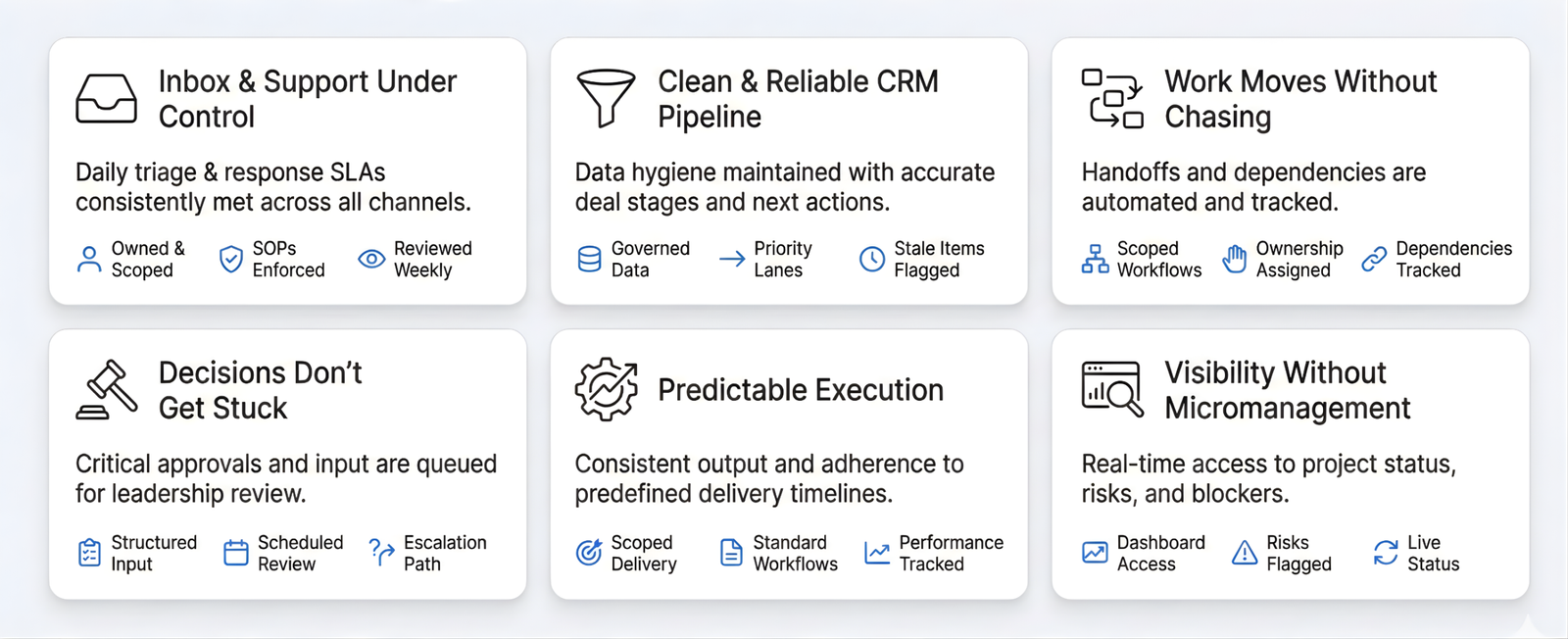
Outcomes are produced by scope,ownership and governed execution-not task volume.
What We Don’t Own
- Business strategy decisions
- Revenue targets or guarantees
- Product roadmap ownership
- Undefined or ad-hoc tasks outside scope
(This is how reliability stays high.)
What We Take Ownership Of
Clear scope boundaries and operating guarantees — defined, enforced, and visible
InboxPrestige doesn’t “assist” or “support loosely.”
We take direct operational ownership of defined systems so execution stays consistent and controlled.
How this works in practice
Real workflows, real deliverables—no black box.
Sample Weekly Ops Report
Shows exactly what’s completed, pending, at risk, and waiting for approval.
Mini SOP / Workflow Example
A real tagging and routing rule that keeps inbox and support organized.
Tools We Work With
Gmail, Outlook, Zendesk, Intercom, HubSpot, Pipedrive, Notion, Slack.
Response Windows & Coverage
Defined working hours, priority lanes, and escalation paths.
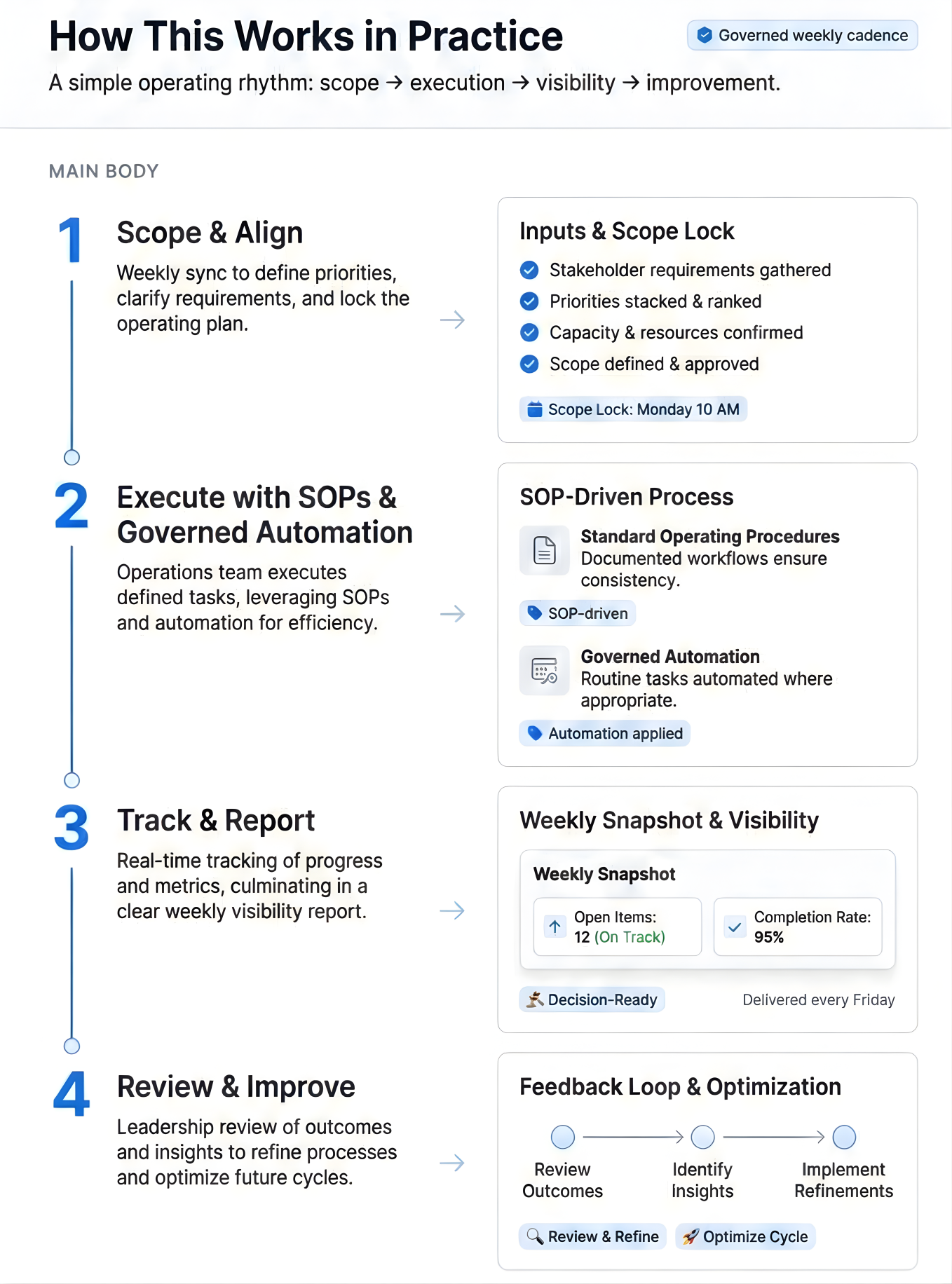
Illustrative structure.Final formats adapt to your tools,scope,and governance model.
Outcomes are produced by scope, ownership, and governed execution — not task volume.
Ready to get your ops under control?
Book a scope call—we’ll map your tools, priorities, and the modules that fit your workflow.
What does InboxPrestige do?
InboxPrestige runs your day-to-day operations as a defined system—covering Support Ops, CRM & Pipeline Ops, Workflows/SOPs, and Weekly Visibility reporting.
Is InboxPrestige a “service” or an ops team?
It’s an ops team that operates inside your tools with clear scope, ownership, and weekly visibility—so execution stays consistent.
Which tools do you work with?
We work inside your existing stack (email, helpdesk, CRM, and internal tools). Specific tools vary by setup—scope is confirmed in the first review.
How do you start working with a new client?
We begin with a scope review: priorities, lanes (urgent/normal), access, and a clean workflow map—then setup SOPs and start daily execution.
Do you provide weekly reporting?
Yes. You get a weekly visibility report that shows what’s done, what’s open, what’s blocked, and what needs your input.
Can you handle CRM and lead follow-ups?
Yes—CRM & Pipeline Ops includes routing, follow-ups, hygiene, and pipeline updates based on defined rules and ownership.
What makes InboxPrestige different from a typical VA agency?
Defined scope + SOPs + ownership + weekly visibility. The system stays consistent—execution doesn’t depend on one person.
Can you support high-volume teams or enterprise needs?
Yes. Enterprise Ops Pods add stronger controls for scale—QA, escalation handling, standards, and structured leadership visibility.
What industries do you work with?
Teams that need reliable ops execution—especially SaaS, e-commerce, and service businesses with support + pipeline workflows.